
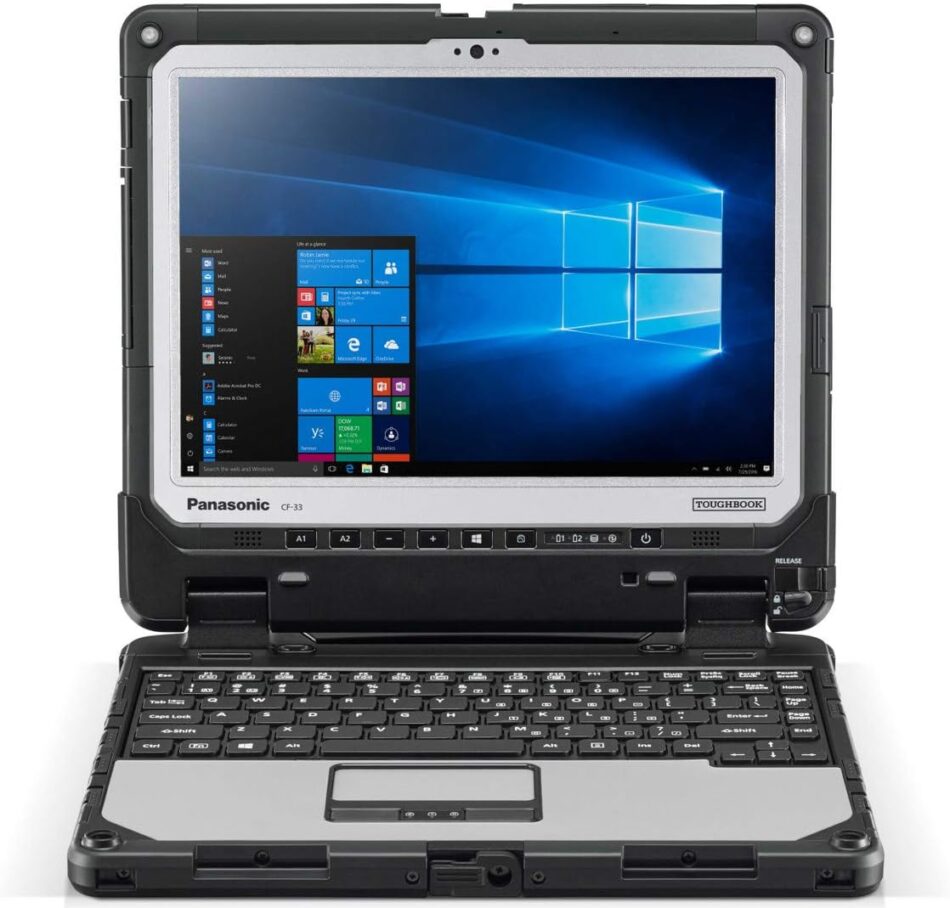
Qatar’s economy is built on high-stakes industries — energy, construction, logistics, defense, and infrastructure — where fieldworkers need hardware that won’t fail when conditions turn harsh. Enter the Panasonic Toughbook in Qatar: a family of rugged laptops and tablets engineered to survive drops, dust, extreme temperatures, and long hours on battery power. For businesses and government organisations in Qatar that demand reliability, a Toughbook is more than a convenience — it’s an operational necessity. This article explains what makes Toughbooks a strong fit for Qatar, compares key models and use-cases, highlights buying and support considerations, and gives practical tips to choose the right device for your organisation.
Why rugged laptops matter in Qatar
The environmental and operational realities in Qatar create conditions that conventional laptops aren’t designed for. Typical pain points include:
- High ambient temperatures and dust in desert and construction sites.
- Exposure to moisture (occasional rain, humidity near coastal areas, or condensate in cooled sites).
- Rough handling in logistics, field maintenance, and emergency services.
- Long shifts that require long battery life or hot-swappable batteries.
- Need for secure, reliable communications and certifications for defence or industrial applications.
A Panasonic Toughbook is purpose-built for these challenges: MIL-STD drop ratings, IP ingress protection, reinforced chassis, sunlight-readable displays, extended battery life, and modular ports. That resilience reduces downtime, lowers total cost of ownership, and increases worker productivity.
Key Panasonic Toughbook product families (at a glance)
Panasonic offers a range of form factors to match different workflows. Here’s a concise breakdown so you know what to look for:
- Fully rugged laptops — Highest durability, sealed designs, often fanless. Best for field engineers, oil & gas technicians, emergency responders, and military applications.
- Semi-rugged laptops — Lighter and less costly than fully rugged models but still more durable than consumer laptops. Good for fleet managers, inspectors, and mobile sales teams.
- Rugged tablets / 2-in-1s — Ideal for users who need portability plus touch/pen input: inventory checks, inspections, healthcare, and point-of-service tasks.
- Rugged handhelds — Small, pocketable devices for barcode scanning, asset tagging, and quick data capture in warehouses or retail.
Different Toughbook models vary in CPU power, screen size, weight, battery options, and modular expansion (barcode scanners, serial ports, dedicated GPUs, LTE/5G modules). Choosing the right family depends on the balance you need between performance, weight, and durability.
Top use-cases in Qatar
- Oil & Gas and Petrochemical Sites
Harsh environments and strict safety standards make rugged laptops essential. Toughbooks withstand dust, vibration, and extreme temperature swings on rigs and plant floors while providing secure access to control systems and diagnostics. - Construction and Infrastructure
Construction managers and surveyors need durable devices onsite for plans, blueprints, progress tracking and BIM apps. Sunlight-readable screens and shock resistance are key. - Utilities and Telecoms
Field technicians require secure remote access, GIS mapping, and measurement tools that keep working through drops and weather exposure. - Logistics and Warehousing
Rugged tablets and handhelds speed warehouse operations — scanning, inventories, route planning — and tolerate repeated drops and dust. - Public Safety and Defence
Police, emergency services, and defence units depend on Toughbooks for communications, mission-critical apps, and secure data handling under demanding conditions. - Healthcare
In hospital wards and ambulance services, rugged tablets can survive disinfecting processes and accidental drops, while enabling patient record access on-the-go. - Education and Research
Field researchers and technical training programs benefit from devices that survive outdoor use, labs, and repeated handling.
What to consider when choosing a Toughbook
- Degree of ruggedness: Choose fully rugged for the worst environments; semi-rugged for lighter fieldwork. Check MIL-STD and IP ratings for drops, shock, dust and water resistance.
- Display: Sunlight-readable and glove-capable touchscreens are essential for outdoor work.
- Battery life & hot-swap: For long shifts, look for hot-swappable batteries or extended battery options.
- Connectivity: LTE/5G, GPS, Wi-Fi 6/6E, Bluetooth, and modular options for field communications matter. Some models offer dedicated GPS/GNSS and optional mobile broadband.
- Ports & expandability: Serial ports, LAN, docking connectors, and expansion bays support legacy industrial equipment and peripherals.
- Performance: Select processor and RAM levels that match your applications — basic data capture vs. CAD/BIM or video analysis.
- Security: TPM, smartcard readers, fingerprint readers, BIOS security and vendor-managed encryption help meet compliance and protect sensitive data.
- Weight & ergonomics: Heavier fully-rugged models offer resilience but may be impractical for long walks; tablets or semi-rugged units sit in the middle.
- Certifications: For defence or regulated industries, check required certifications (e.g., FIPS, compliance standards) before purchase.
- Warranty & support: On-site warranty, regional service centres, and fast spare-part availability reduce downtime — critical in Qatar where field uptime is essential.
Buying and local support considerations (Qatar)
When procuring Toughbooks in Qatar, aim for authorised Panasonic resellers or certified distributors that offer:
- Local warranty and on-site service options.
- Stock of replacement batteries, power adapters, and screens.
- Professional configuration services (asset tagging, OS imaging, mounting solutions).
- Integration support for connectivity modules (eSIM activation, VPN, fleet management).
Even when suppliers are available regionally, plan for spare parts and a service SLA to match operational risk. For enterprise deployments, consider a pilot program (10–20 units) to validate device choice, accessories, and workflows before large-scale purchase.
Deployment tips for Qatar operations
- Protect against dust and heat: Use protective cases and choose devices with high IP ratings. Position docking stations or chargers in cooled spaces.
- Use fleet management: Mobile device management (MDM) helps push updates, manage security, and track lost/stolen units.
- Configure power profiles: Tune power settings for field use; enable battery-conservation modes and rapid charging where available.
- Training: Train field staff on rugged device handling (what it can and cannot tolerate), cleaning procedures (approved disinfectants), and basic troubleshooting.
- Accessories: Invest in vehicle docks, hand straps, shoulder straps, vehicle power adapters, and shoulder holsters to increase safety and usability.
- Rugged peripherals: Look for rugged keyboards, barcode scanners, and printers that match the durability of the Toughbook to avoid weak links.
Cost and total cost of ownership (TCO)
Rugged devices carry a higher upfront cost than consumer notebooks, but TCO often favours Toughbooks in industrial settings because:
- Fewer replacements due to accidental damage.
- Lower downtime and support costs.
- Better lifecycle support (business-grade warranties and parts).
- Reduced productivity loss from device failures in the field.
When budgeting, include accessories, protection plans, spare batteries, service agreements, and MDM licenses to get a realistic picture of long-term spend.
Common myths and realities
- “Rugged means heavy and slow.” — Not always. Modern Toughbooks are designed to balance performance with durability; many models deliver contemporary CPUs, fast SSDs, and efficient batteries while remaining reasonably portable.
- “You don’t need rugged devices indoors.” — Even within facilities, devices face drops, spills, and repeated handling; semi-rugged units often outperform consumer laptops in longevity.
- “All rugged laptops are the same.” — Ruggedness is a spectrum. Always match the device’s specific ratings and modular options to your use-case.
Future-proofing your purchase
- Look for models with modular expansion (e.g., swappable I/O bays) so you can add LTE/5G, barcode scanners, or extra ports later.
- Choose devices with current-generation wireless standards and options for cellular upgrades.
- Ensure the vendor offers a clear spare-parts roadmap — essential for multi-year deployments.
Conclusion
For Qatar’s demanding industries, Panasonic Toughbooks represent a sound investment in resilience and reliability. From oil rigs to ambulance corridors, these devices reduce operational risk by delivering predictable performance where it matters most. Choosing the right Toughbook requires understanding the specific environmental and workflow needs of your teams, planning for support and spares, and factoring in TCO rather than just upfront price. With the right model, accessories, and service contract, a Toughbook can become one of your organisation’s most dependable tools — built to work every hour of the day, whatever the conditions.


